Law enforcement
Media preservation, a repeatable sequence of steps and documentation ready for the case file.
 EvidLockV2
Forensic Evidence Tool for Windows
EvidLock preserves, analyses and documents digital evidence in a single environment — from the first checksum to the finished report. All of it locally: no cloud, no account, nothing sent anywhere.
CORRELATION GRAPH — LIVE
15 RULES — every edge carries a rule, a confidence level and its stated limitations
0 bytes
sent outside your machine15 rules
of explicit evidence correlation8 modules
Player · View · Commander · Carver · Voice · Tracker · Network · SandboxSHA-256
at every stage of the workWho it is for
Repeatable procedure, a legible audit trail and a demonstrable link between finding and source — these are the demands of criminal proceedings. The same demands apply to the expert witness, the incident response team, the auditor and the student still learning the method.
Media preservation, a repeatable sequence of steps and documentation ready for the case file.
Opinions grounded in verifiable checksums, with interpretive limits stated openly.
Incident response and artefact analysis without moving data outside the organisation.
Material inventory, integrity control and reports for internal proceedings.
A complete workbench on a single laptop, working without any network access.
Cybersecurity, digital forensics and technology law — a full workbench on your own laptop.
One environment for classes on media preservation and timeline building, with no network required.
Carving, memory analysis, YARA rules and a correlation graph in one place.
Modules
Each module opens as its own window and works on the same case material — no intermediate exports, no copying paths between tools.
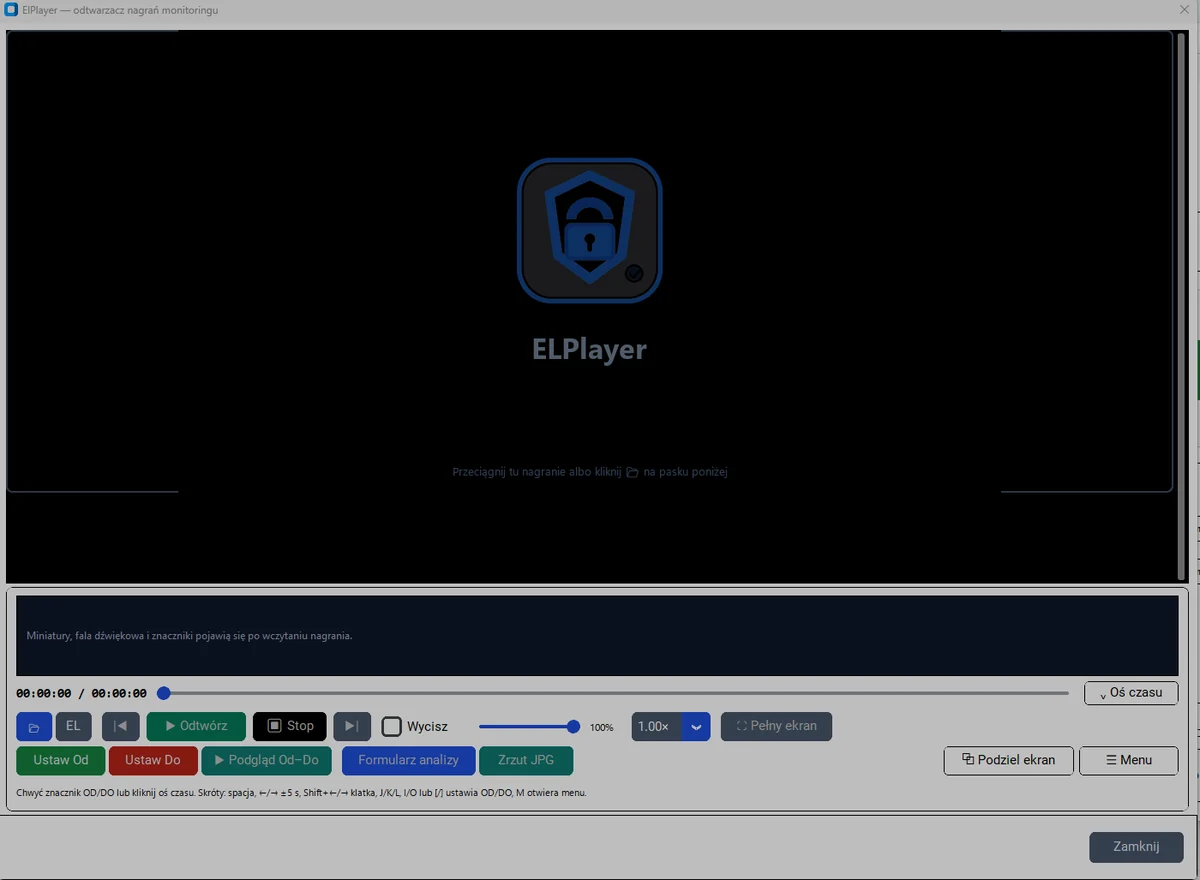
ElPlayer
A player built for evidentiary material: precise CFR and VFR timeline, From–To markers, multi-camera support and split screen.
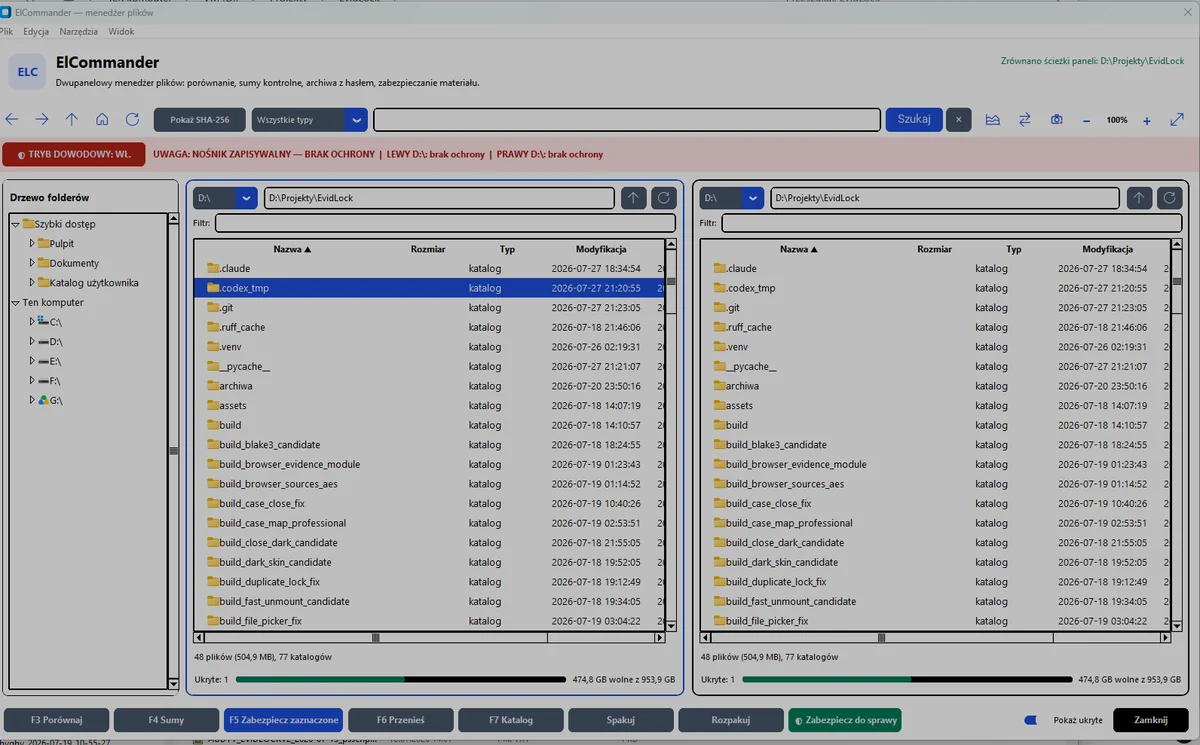
ElCommander
A file manager that computes checksums on the fly and warns you when the medium is writable — before you make a mistake.
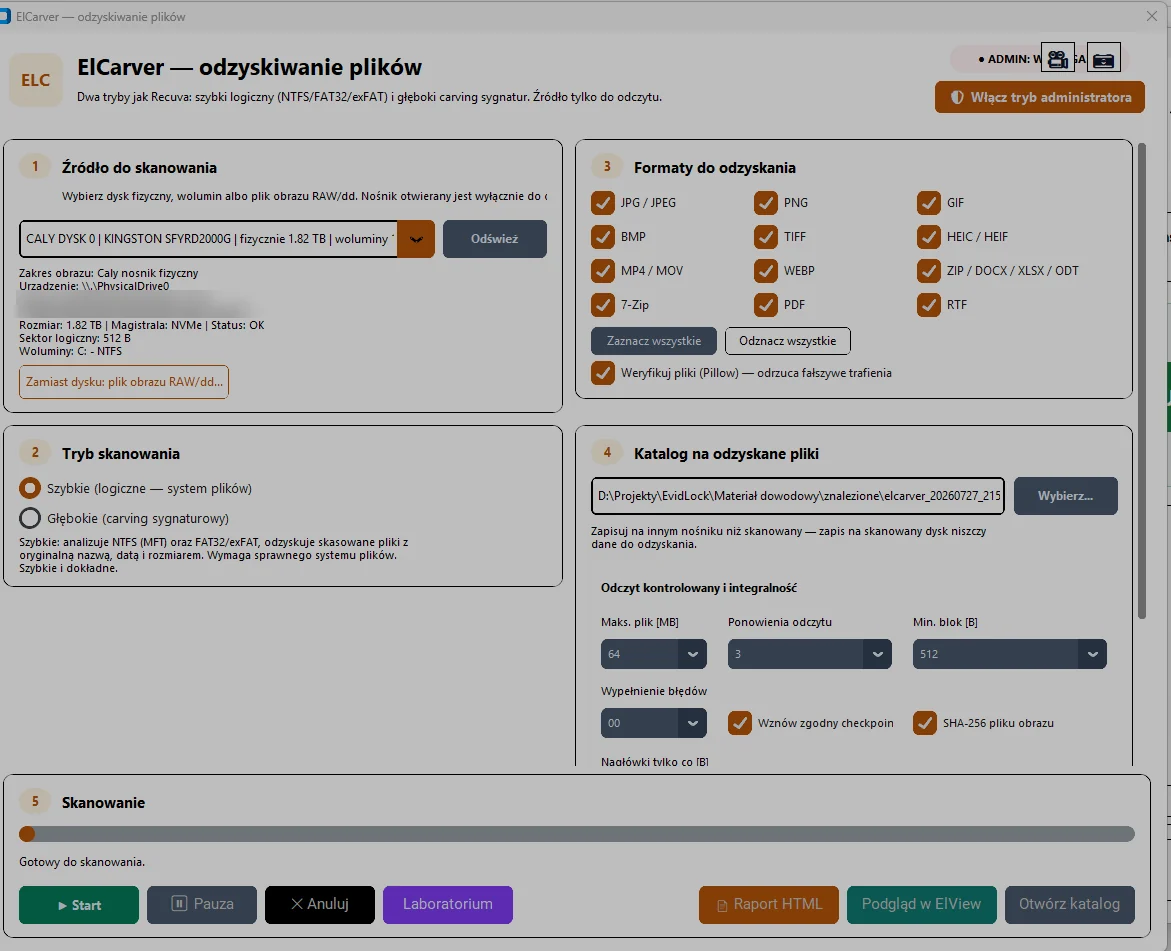
ElCarver
Two modes: fast logical recovery on NTFS, FAT32 and exFAT, and deep signature carving. The source is opened strictly read-only.
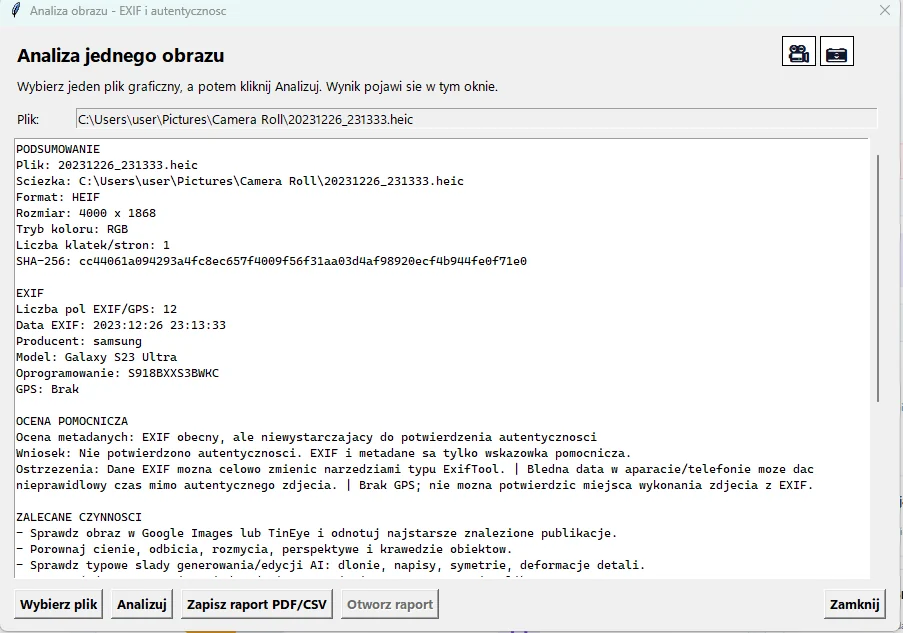
ElView
Photographic material review with cropping, EXIF and HEIC metadata reading, and every file preserved with a SHA-256 checksum.
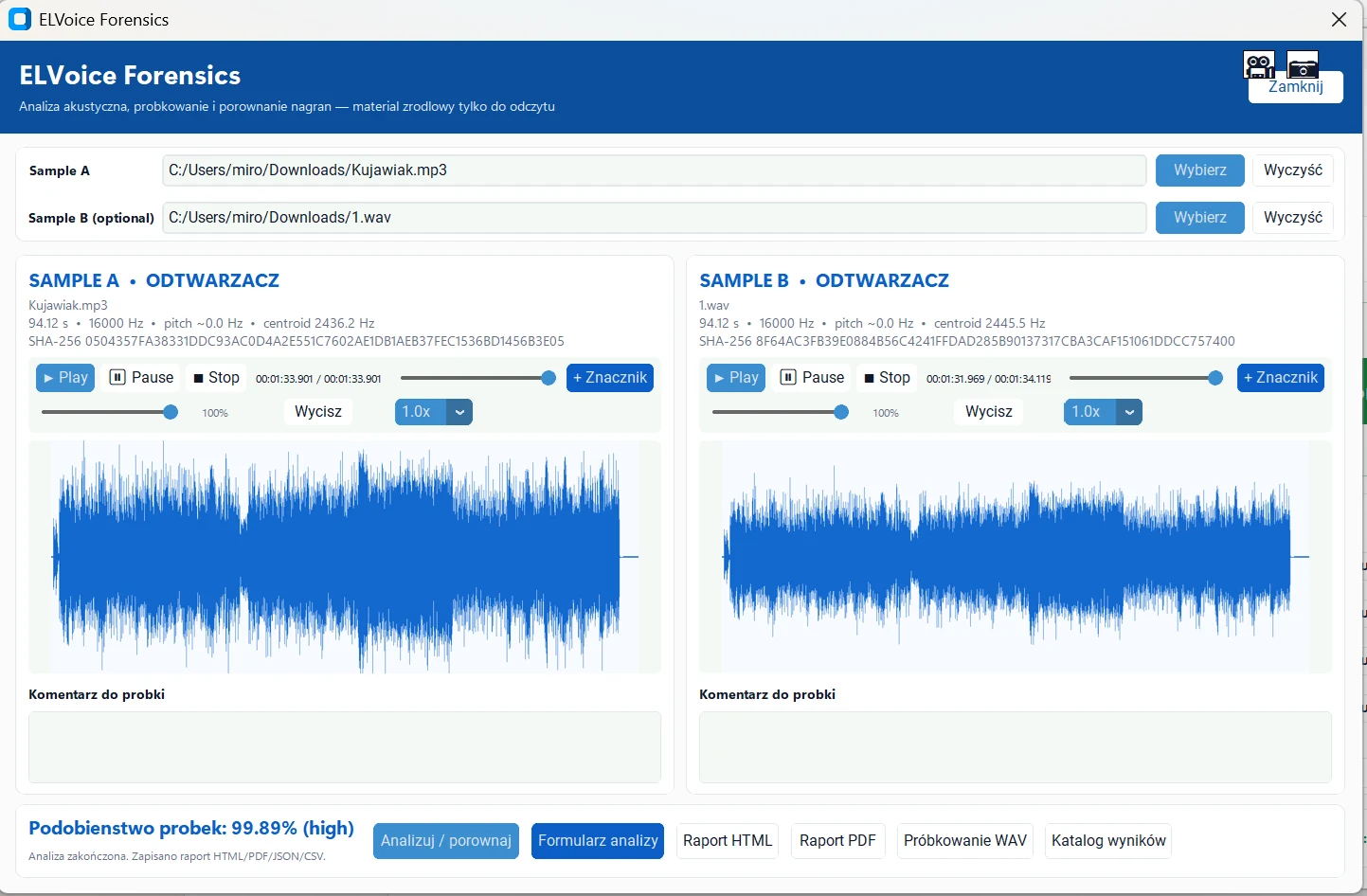
ELVoice
Audio sample analysis performed entirely on your workstation. Waveform, spectrogram and a comparison of two recordings with the method stated openly.
ELTracker
Local analysis of iOS backups, Android trees, shared storage, backup.ab and Google Takeout without modifying the source.
ELNetwork
PCAP analysis by Suricata and Zeek in a single run. The capture is never altered and every run gets its own manifest.
ELSandbox
A controlled session inside the native Windows Sandbox. Only a SHA-256 verified copy of the material reaches the guest, read-only — the case folder is never mapped.
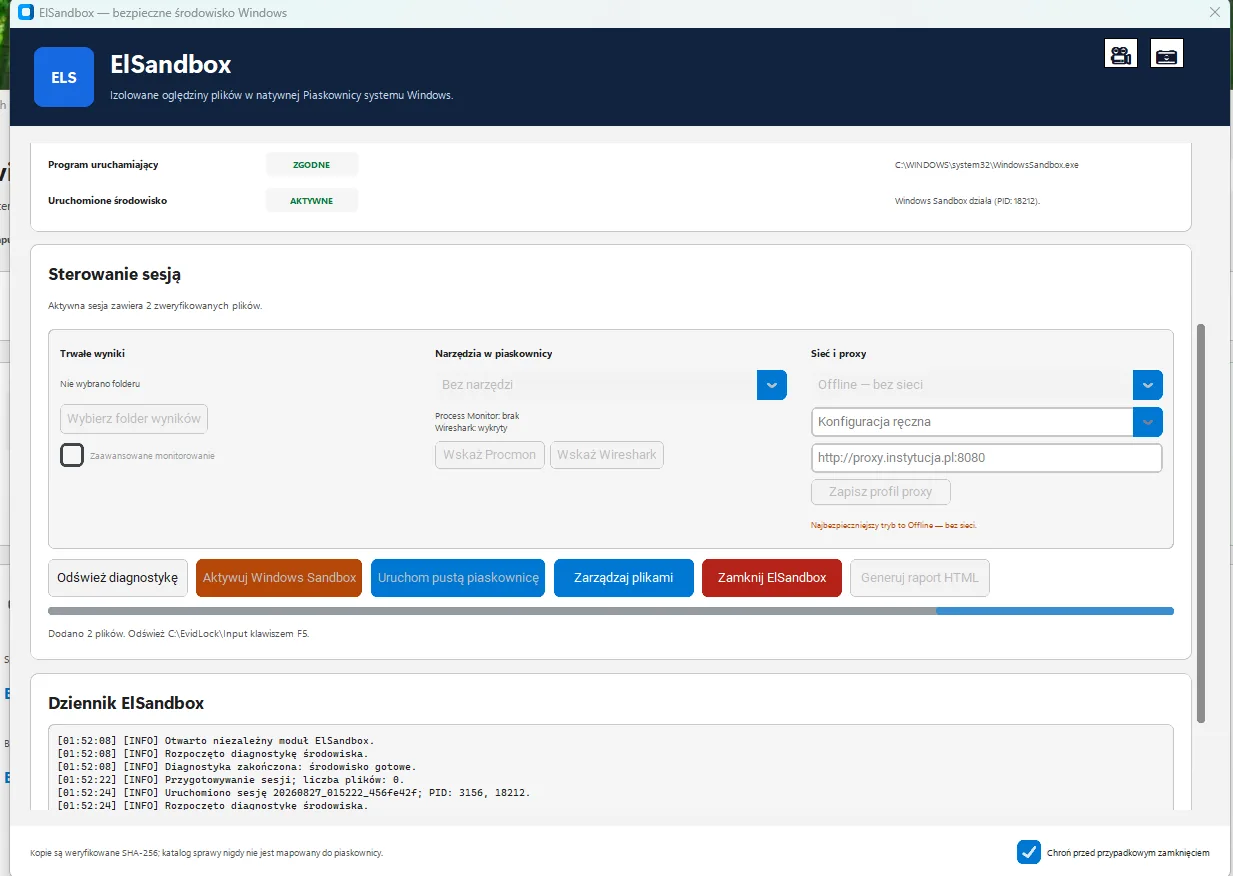
Isolation model
Set the session up the way you would in the module. The diagram and the .wsb configuration below change exactly the way ELSandbox changes them — this is the same set of decisions, not an illustration.
The default and the recommended mode for an unknown file. The guest has no network, so the examined program cannot reach a command server or pull down the rest of its payload.
The guest uses the network shared by Windows Sandbox. Traffic from the examined program leaves the machine — this mode makes sense only when you deliberately want to observe those connections.
The proxy is a setting inside the guest — WinINET, WinHTTP and environment variables — not a filter enforced from outside. The examined program may ignore it, use another protocol or connect directly. Controlling traffic requires network segmentation on the infrastructure side.
The ElSandbox_secure.wsb configuration for these settings
<Configuration>
  <VGpu>Disable</VGpu>
  <Networking>DisableEnableEnable</Networking>
  <MappedFolders>
    <MappedFolder>
      <HostFolder>%LOCALAPPDATA%\EvidLock\ElSandbox\sessions\20260827_014522_9f3ac1b8\input</HostFolder>
      <SandboxFolder>C:\EvidLock\Input</SandboxFolder>
      <ReadOnly>true</ReadOnly>
    </MappedFolder>
    <MappedFolder>
      <HostFolder>%LOCALAPPDATA%\EvidLock\ElSandbox\sessions\20260827_014522_9f3ac1b8\control</HostFolder>
      <SandboxFolder>C:\EvidLock\Control</SandboxFolder>
      <ReadOnly>true</ReadOnly>
    </MappedFolder>
    <MappedFolder>
      <HostFolder>D:\Sprawy\PR-2-Ds-114-2026\ElSandbox_Output_20260827_014522_9f3ac1b8</HostFolder>
      <SandboxFolder>C:\EvidLock\Output</SandboxFolder>
      <ReadOnly>false</ReadOnly>
    </MappedFolder>
    <MappedFolder>
      <HostFolder>C:\Program Files\Sysinternals</HostFolder>
      <SandboxFolder>C:\EvidLock\Tools\procmon</SandboxFolder>
      <ReadOnly>true</ReadOnly>
    </MappedFolder>
    <MappedFolder>
      <HostFolder>C:\Program Files\Wireshark</HostFolder>
      <SandboxFolder>C:\EvidLock\Tools\wireshark</SandboxFolder>
      <ReadOnly>true</ReadOnly>
    </MappedFolder>
  </MappedFolders>
  <LogonCommand>
    <Command>powershell.exe -NoLogo -NoProfile -ExecutionPolicy Bypass -File C:\EvidLock\Control\bootstrap.ps1</Command>
  </LogonCommand>
  <AudioInput>Disable</AudioInput>
  <VideoInput>Disable</VideoInput>
  <PrinterRedirection>Disable</PrinterRedirection>
  <ClipboardRedirection>Disable</ClipboardRedirection>
  <ProtectedClient>Enable</ProtectedClient>
  <MemoryInMB>4096</MemoryInMB>
</Configuration>
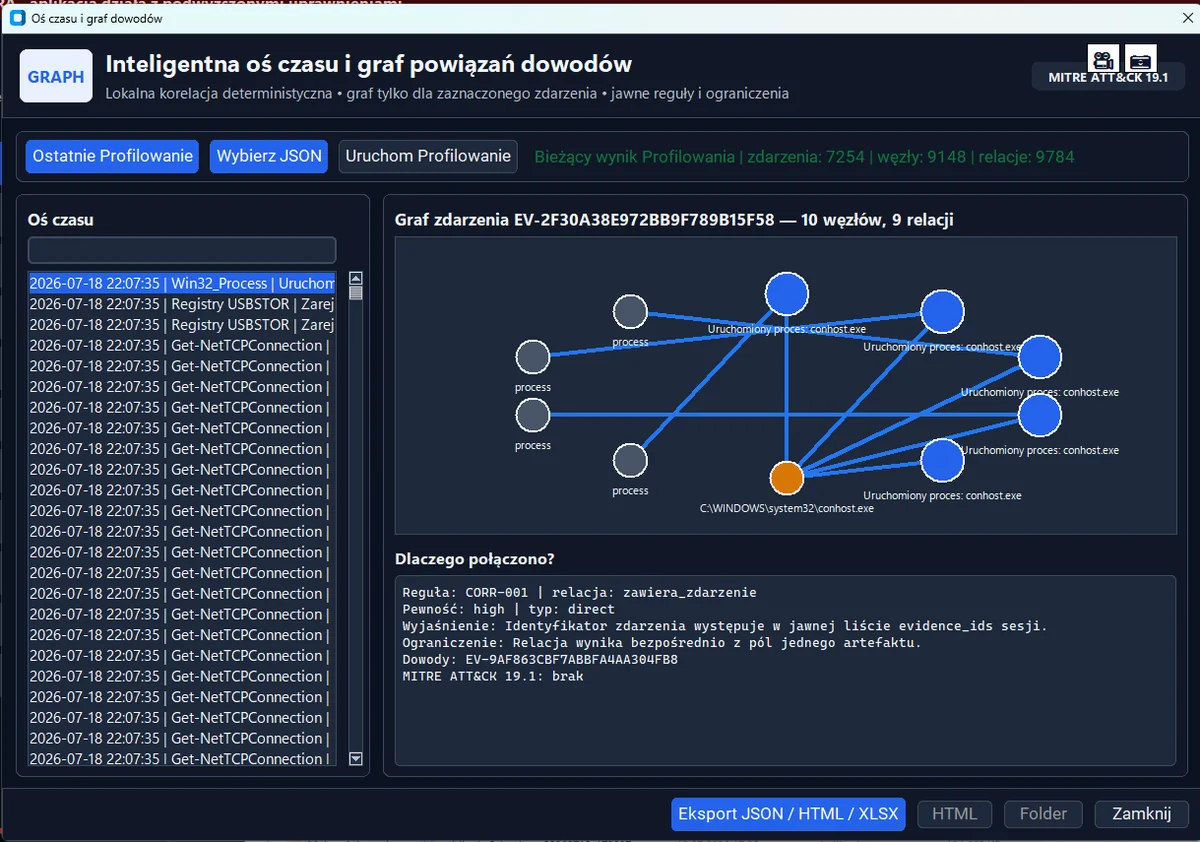
Timeline and evidence graph
Activity profiling brings EVTX events, registry, Prefetch, LNK, Jump Lists, ShellBags, USBSTOR, Amcache, ShimCache, SRUM, processes, network connections and browsers into a single UTC timeline.
Deterministic correlation
A local graph works over the normalised records with 15 explicit correlation rules. Clicking an edge reveals the rule, its confidence level, an explanation, the limitations and the evidence identifiers.
Plaso
You point to a media image and EvidLock builds a full timeline from it, loading the result straight into the correlation graph. No shuffling files between tools.
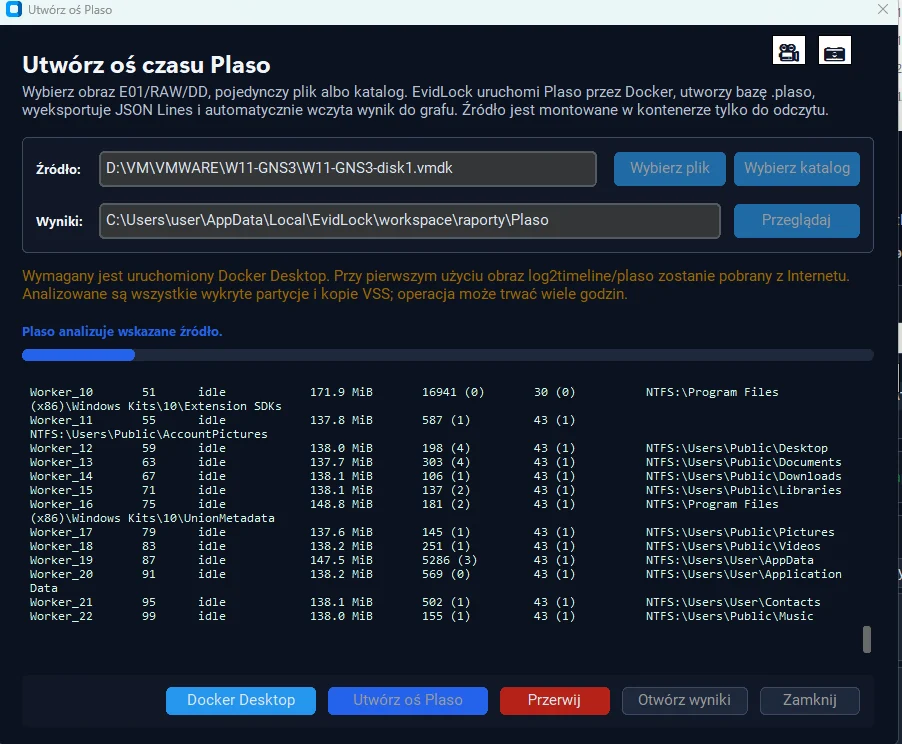
Plaso integration. The timeline is built entirely on your own workstation and the source material remains untouched. The feature is available regardless of the chosen installation variant.
Volatile memory
Encryption keys, open connections, running processes and content that never touched the disk exist only in memory. Capturing it is a step that cannot be repeated.
Capture and analysis
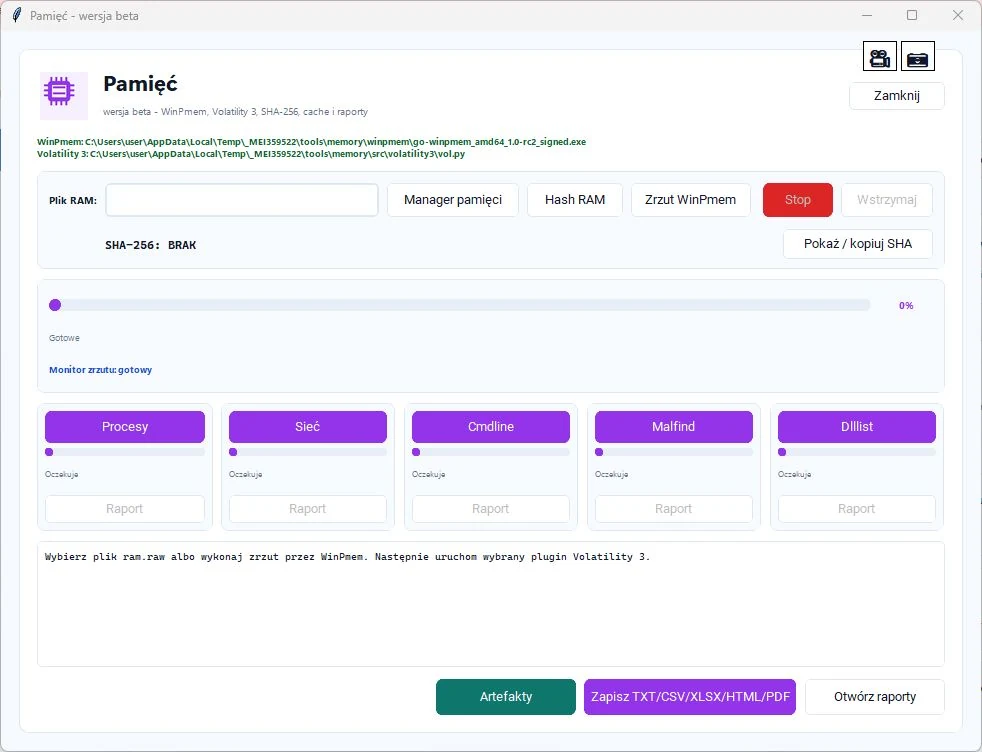
Memory captured with WinPmem, with visible progress and a SHA-256 checksum computed immediately. Analysis runs directly on the acquired image.
HEX viewer
A paged HEX view of the capture — the image is never read in full, so a file tens of gigabytes in size opens instantly.
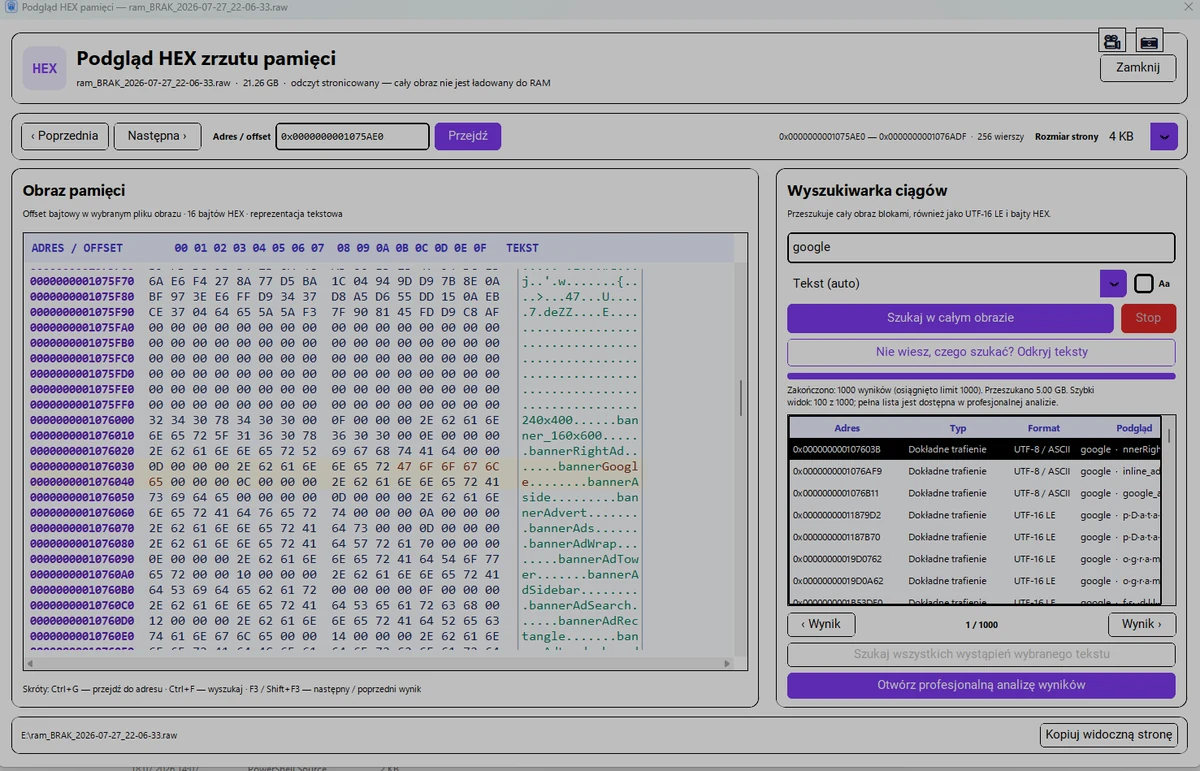
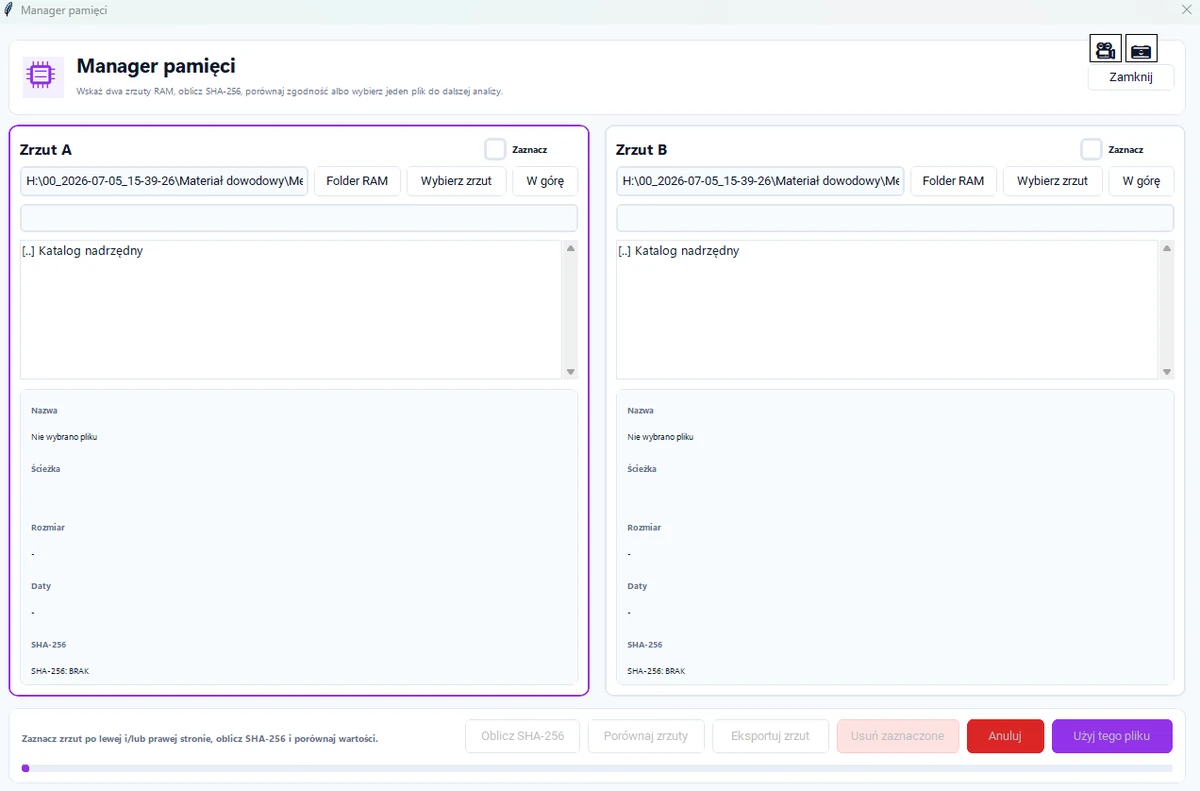
Image manager
Comparison of two memory images: SHA-256 computed for both and presented next to each other. It lets you demonstrate that a copy is faithful to the original.
The module is marked beta. Memory capture requires administrator rights and always alters the state of the examined system — it cannot be acquired without leaving a trace. We say so plainly, because that circumstance belongs in the record of the procedure.
Reports and event journal
Evidentiary work does not end at the finding, but at whether that finding can be reproduced and demonstrated. EvidLock records the course of work as it happens.
Event journal
Every operation enters the journal with its time, level, sequence number, module and duration. The record is written as you work, so the report is not a separate task at the end of the day.
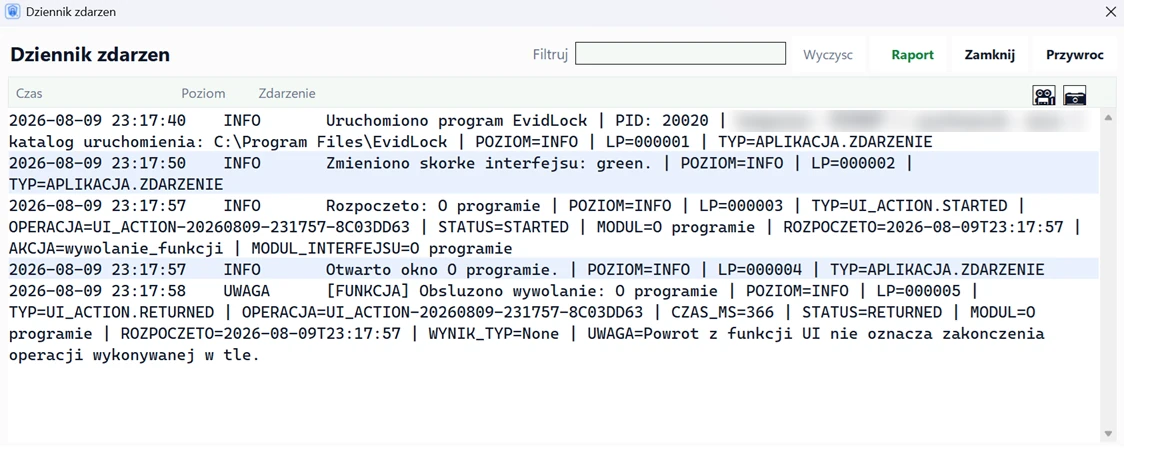
Windows logs
Application, security, setup and system events exported with a chosen time range and record limit.
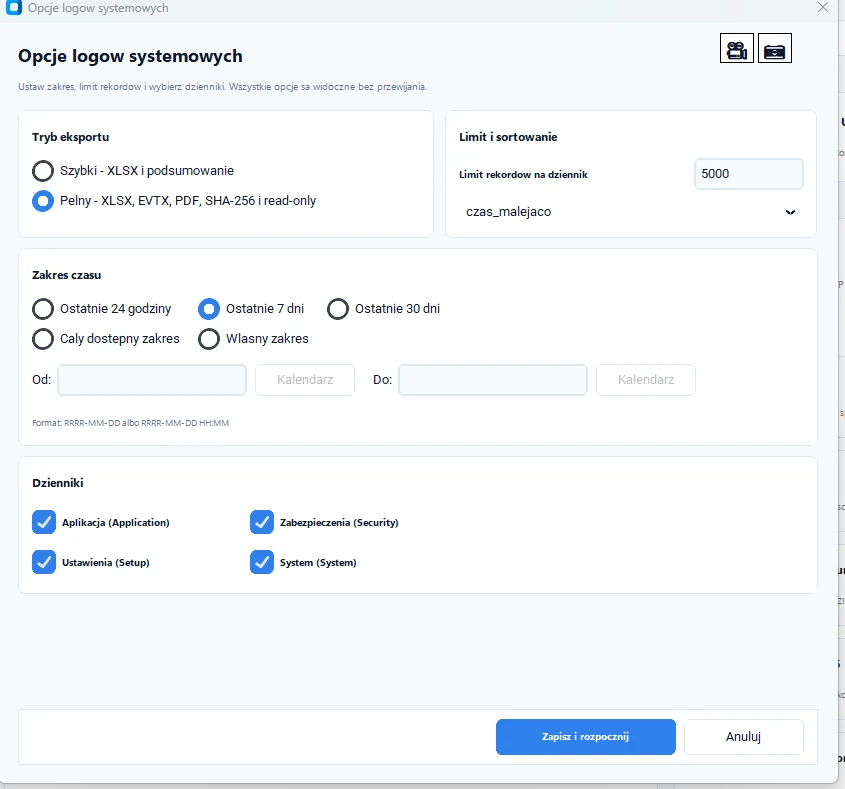
The documentation is ready for the case file immediately — with no manual tidying, retyping or computing checksums in a separate tool.
Scope of work
SHA-256 for files and directories, deterministic manifests, BLAKE3 for fast inventory, MD5 kept solely as a compatibility value.
One click: read-only attribute, encryption check, checksums, manifest, report and a password-protected archive.
Capture via WinPmem, optionally pagefile, swapfile and hiberfil, analysis in Volatility 3 and checksums. Module in beta.
Imaging disks and volumes to RAW/ISO, mounting, comparing images and reading E01/Ex01 and AFF4.
A shared database for seven independent scans: file signatures, encryption, hash sets, YARA, SQLite journals, phone backups and Sleuth Kit.
History, bookmarks, downloads, cookies, cache and saved-password metadata, with a risky-content filter.
Registry export to .hiv, CSV, XLSX, TXT and PDF, and system logs to XLSX, EVTX, PDF and TXT.
Multi-threaded phrase search across names and inside text, PDF, Office, OpenDocument and EML files.
PDF, CSV, TXT and XLSX reports, a final case report and an operations journal with an interactive HTML report.
BitLocker, LUKS, FileVault and encrypted archives, documents and keys. Containers without a signature are reported as suspicion, never as certainty.
Addresses, contacts and paths extracted from WAL and journal files — from writes that have not yet reached the browser or messenger database.
Recognising iTunes/Finder and adb backups: device model, system version, backup date, file count and encryption status.
Describing the properties of a recording and comparing two samples with a waveform and spectrogram. The result is an indication, never speaker identification.
PCAP captures analysed by Suricata and Zeek: alerts, connections, DNS, HTTP, TLS and files in one view, with a manifest that lets the analysis be repeated.
An unknown file opened in the native Windows Sandbox: a verified read-only copy, networking off by default, the case folder never mapped.
Releases
One application installer, three portable variants and four modules with their own installers. All share the same engine and the same case format.
Testing phase. EvidLock has no production release yet — testing is under way, and the scope and behaviour of the modules may still change.
Downloads on hold — The files will be published once code signing is finished and the SHA-256 checksums are available.
Release details on evidlock.pl
Installer or portable? The installer registers the program in the system, creates shortcuts and handles updates. The portable build runs from a USB stick, with no installation — but it starts noticeably slower, because it unpacks itself on every launch.
Every commercial release requires an ELP1 key. Without a key the program starts in demonstration mode with a limited number of launches.
Full release descriptions, requirements and checksums are on evidlock.pl. Before running a file, compare its SHA-256 sum with the value published next to the release.
Security
EvidLock processes the material on the operator’s computer. The update server serves nothing but program files, and the ELP1 activation server handles the licence and pseudonymous identifiers — it never receives the files being analysed.
Installers come with published SHA-256 checksums. Production updates additionally require a valid Authenticode signature.
The activation API accepts only the data needed to verify the device and run limits.
The website, the update files and the licence console run on separate subdomains.
Issued extensions and server decisions are written to a controlled journal.
EvidLock organises and correlates artefacts, but it does not automatically attribute actions to a person. Every link in the graph carries an explicit rule, a confidence level and its stated limitations — you draw the conclusions and you defend them.